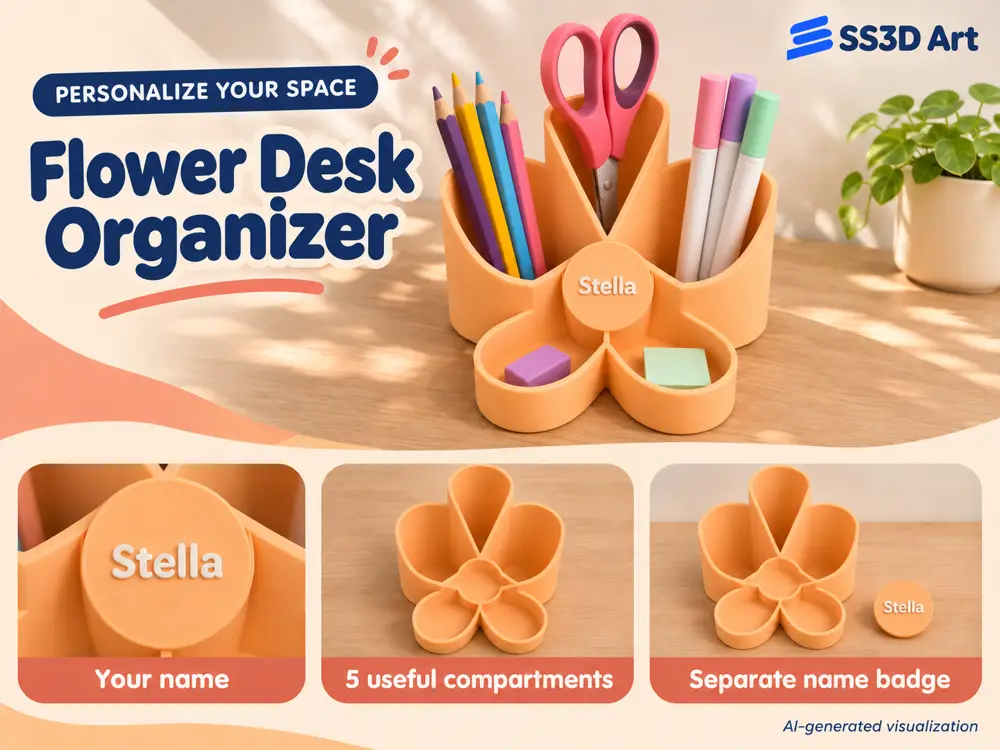
Flower Desk Organizer | Custom Name


A little bloom for your everyday desk
Give pens, pencils and the little things a place of their own. This flower-shaped organizer combines five useful compartments with a separately printed name badge — a cheerful desk companion and a personal gift.
Why you will love it
• Three tall petal cups for pencils, pens, scissors or brushes.
• Two low front trays for erasers, paper clips and small stationery.
• A raised printed name: no paper label or hand painting.
• A separate badge plate keeps color changes away from the tall body.
• One-piece organizer body, printed upright without supports.
Personalize the name badge
1. Open the supplied Flower-Name-Badge.scad in OpenSCAD.
2. Change Name and render the badge. Short names work best.
3. Leave Scale at 1 to match the supplied Stella organizer.
4. Export disc and lettering as separate components, import them together as one object and assign your Anycubic filaments.
You can also edit the supplied OpenSCAD source locally. Badge_Component selects the complete badge, disc or lettering. Import the two color components together as parts of one object, preserving their coordinates. The full organizer source also exposes body dimensions and colors.
Two plates, a simpler color workflow
• Plate 1 — peach organizer body, upright.
• Plate 2 — peach name badge with cream raised lettering, flat.
• Without a multicolor system, use a single-color badge or a manual filament change at the lettering transition after checking the layer preview.
Print the Stella preset
Anycubic PLA · Anycubic Kobra 4 · 0.4 mm nozzle · textured PEI · 0.20 mm layers · 3 walls · 12% gyroid · supports off. Colors, parts and plates are assigned in the supplied project. Keep the supplied orientations.
Default body: approximately 139 × 134 × 90 mm. Badge: 38 mm diameter, 2.4 mm base plus 0.6 mm raised lettering. Changing the body scale also changes the matching badge size.
Assembly
1. Print the body and badge. Clean any brim or first-layer burrs.
2. Dry-fit the badge against its circular front seat and check the name orientation.
3. Apply a small amount of PLA-compatible adhesive to the back of the badge, position it and let it cure as directed.
The medallion is a glue-on decorative badge. It is not a lid, hidden container or snap-in insert; it is not designed for tool-free replacement after gluing.
Included files
• Prepared Stella print project with two arranged plates.
• Editable badge and organizer OpenSCAD sources.
• Badge geometry and English printing/assembly instructions.
Photos and useful notes
Real photographs show our actual printed Stella organizer. Images labeled AI-generated are presentation or assembly illustrations. Stationery is not included. This is a desk organizer, not a watertight vase. Keep PLA away from high heat.
Have a name or color combination in mind? We would love to see your finished organizer. Design and presentation by SS3D Art, created with AI assistance.
You are prohibited from sharing, sub-licensing, selling, renting, hosting, transferring, or distributing the digital file or 3D printed versions of this object, as well as any other derivative work in either digital or physical form (including remixes).You are not allowed to use the objects in any manner that involves charging money or collecting fees without permission.